Best FPV Drone Kits of 2026

An FPV kit is easy to get wrong because the box tells you so little. Goggles, controller, batteries, charger and case all have to be there; miss one and you're grounded until a second order arrives. Then comes the first flight, seen entirely through a camera on the drone's nose, and a good kit forgives you while you learn.

The goggles mattered more than the camera, and the battery count more than the rated flight time: one pack is a tease, three is an afternoon. We flew eight kits in backyards at dusk, on an empty soccer field and in a school gym on rainy days, with one tester who had never flown FPV before. A palm-size indoor trainer sits at one end of the list and a 360-degree camera drone at the other.

Our Top Picks

The Best FPV Drone Kits

1.

DJI Avata 2 Fly More Combo Best Overall
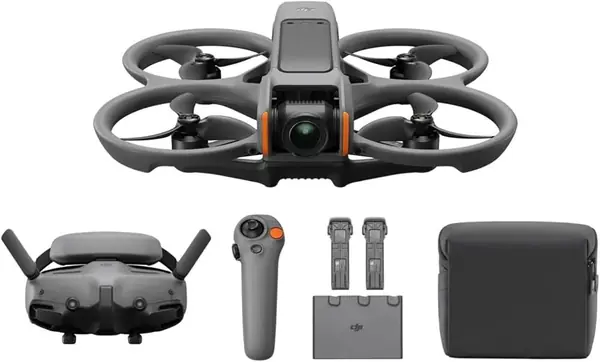
DJI Avata 2 FPV drone in black with Goggles 3 and RC Motion 3 controller

First FPV kit

Track Score 91/100
Kit Contents
Goggles 3, RC Motion 3, 3 batteries, charging hub, sling bag
Weight
13.3 oz
Camera
4K/60fps, 155° field of view
Rated Flight Time
Up to 23 minutes
View on Amazon

Goggles on, and the Avata 2 stops being a drone you watch from the ground and becomes a cockpit you sit in: a 155-degree view wraps forward and down, and the motion controller turns your wrist into the stick. That feeling is what people are actually shopping for when they start looking at FPV kits, and this is the package we hand them first. It arrives complete — Goggles 3, RC Motion 3, three batteries, a two-way charging hub, and a sling bag.

What makes it the right first kit is how much it flatters an unskilled pilot. Squeeze the trigger to go forward, tilt your hand to steer, and one button pulls off a flip, a roll, or a 180-degree drift, so your first afternoon produces footage that looks like the clips that got you interested. The camera is a 1/1.3-inch sensor recording 4K at 60 fps with RockSteady stabilization, and the built-in propeller guards mean a misjudged gap is usually a bruise rather than a rebuild.

Three batteries in the box is the detail that makes a session feel like a session; the rated 23 minutes is a best case, and we plan on landing well before it. The 13 km transmission figure is far more range than you'll use inside visual line of sight, but it does mean the feed holds up when you dip behind a tree. We're also fond of the small inclusions — a spare prop pair and screws, extra goggle foam, and a pair of -2.0D corrective lenses that let a mildly nearsighted flier skip a prescription insert.

Do the setup at home rather than at the field: the drone has to be activated in the DJI Fly app, which you download from DJI's site since it's no longer on Google Play, and firmware plus a first full charge on three batteries eats an evening. Then fly that first pack somewhere forgiving. Kits occasionally arrive with a fault, and a dead gimbal found on day one is a return rather than a ruined trip.

Worth Noting

  • No obstacle sensing to catch a bad line
  • Above 250 g, so FAA registration applies
Our Verdict

We recommend the Avata 2 combo to anyone who wants a real FPV kit out of one box: goggles, motion controller, three batteries, and a guarded drone that forgives a beginner's mistakes.

Check Latest Price
2.

DJI Neo 2 Motion Fly More Combo Best for Beginners

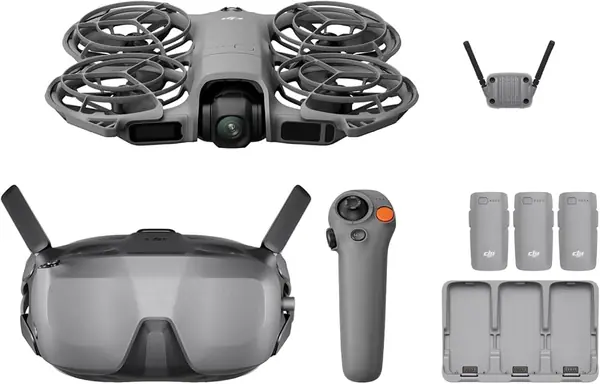
DJI Neo 2 gray mini drone with Goggles N3 and RC Motion 3

Learning FPV indoors

Track Score 90/100
Kit Contents
Goggles N3, RC Motion 3, 3 batteries, charging hub
Weight
5.33 oz
Camera
4K video, 12 MP stills
Obstacle Sensing
Omnidirectional
View on Amazon

At 151 grams the Neo 2 lifts off an open palm and lands back on it, which is the least intimidating launch we know of. Full-coverage propeller guards cover the blades, the whole package — drone, Goggles N3, RC Motion 3, three batteries, charging hub — drops into a daypack, and at that weight it stays under the FAA's 250-gram registration line.

We think of it as a first set of goggles rather than a first racing drone, and we're comfortable with that. The motion controller works the same trigger-and-tilt way as the Avata 2's, so there are no sticks to coordinate, and omnidirectional obstacle sensing means a hallway wall stops the flight instead of the propellers. It isn't quick — 26 mph at the top of sport mode, and a breeze pushes it around — but the 4K footage is steadier than that number suggests, and ActiveTrack keeps you in your own video while you fly it.

Recordings stay in the drone's built-in storage, with no card slot to add, so make offloading to your phone part of the routine before the next outing. Leave the goggles in the bag and palm takeoff plus hand gestures still get you a hover-and-shoot selfie — a trick the faster kits here can't match.

Worth Noting

  • Short airtime on each battery
Our Verdict

For a first set of goggles we point beginners at the Neo 2: 151 grams, full propeller guards, and obstacle sensing make the first flights easy to survive.

Check Latest Price
3.

Antigravity A1 Explorer Bundle Best 360 Footage

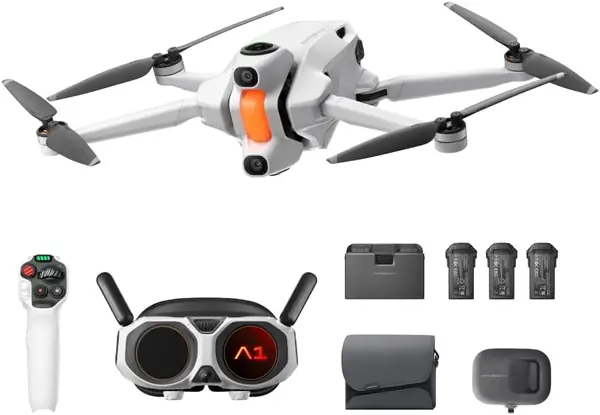
Antigravity A1 white 360 FPV drone with Vision Goggles and grip controller

360 aerial video

Track Score 88/100
Kit Contents
Vision Goggles, grip controller, 3 batteries, case, spare props
Weight
8.78 oz
Video
8K 360° capture
Goggles
90° FOV, dual 1-inch Micro-OLED
View on Amazon

The A1's pitch is that you no longer have to nail the shot while you're flying. It records a full 8K sphere around itself, stitches the drone out of the frame, and lets you drag out the framing afterward on the ground, so one pass through a gap or along a ridge comes home as a wide, a tight follow, and everything in between.

The goggles are the other half of the deal: dual 1-inch Micro-OLED panels behind pancake optics, with a 90-degree field of view. Newcomers can fly in FreeMotion mode, pointing where they want the drone to go, while experienced pilots switch to FPV mode and use the sticks. Obstacle avoidance and Deep Track following handle the busywork, and the Explorer bundle covers the practical side with three batteries, a charging hub, a carry case, and eight spare props.

We think this is the most interesting kit here for anyone who shoots video rather than chasing the sensation of flight. It is listed at 249 grams with a 10 km link and obstacle avoidance, which is a lot of drone to fit under the registration line. The trade-off is a step at the desk: 360 footage has to be reframed and rendered before it plays like a normal video, and that's real work after every session. Antigravity also lists US-based repair centers, which is quieter than 8K but the thing you'll remember the first time a prop meets a tree.

Worth Noting

  • The most expensive kit in this group
Our Verdict

We recommend the A1 to anyone who wants footage they can reframe after landing — a single 8K 360 flight gives you several usable shots.

Check Latest Price
4.

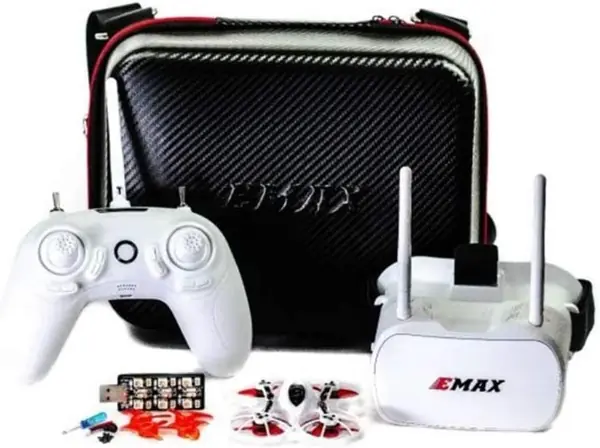
EMAX Tinyhawk RTF Kit

EMAX Tinyhawk white micro FPV drone with goggles, controller, and carry case

Indoor FPV practice

Track Score 79/100
Kit Contents
Goggles, controller, drone, battery, carry case
Video
Analog
FPV Range
Up to 200 feet
Top Speed
Up to 35 mph
View on Amazon

The Tinyhawk is the cheapest way on this page to put goggles on your face and fly, and that's why we keep it around. Drone, goggles, and controller arrive bound to each other in a case with a battery, so you charge it, switch it on, and you're flying — line of sight first, through the goggles shortly after. For someone who wants to find out whether FPV is for them before spending DJI money, that's the whole argument.

It's analog video rather than Wi-Fi, which is the point: a dedicated feed reaches about 200 feet and doesn't lag the way a phone-tethered signal does. Three modes take you from level flight through horizon assist to full acro, and at up to 35 mph in a body this small it's a quick way to learn throttle control. Indoors and on calm days it's a blast; a breeze pushes it around, and the analog picture is coarse next to the digital kits, which is the trade for the price.

Build quality is the gamble. The airframe and props take crashes that would end a bigger drone's day, but the switches, the camera mount, and the goggles are the parts that give trouble, so go in expecting to tinker. Bought as an indoor trainer for someone who wants to learn to fix what they fly, it earns its keep.

Worth Noting

  • Bare-bones instructions leave beginners guessing
Our Verdict

We keep the Tinyhawk on the list because it's the least expensive real FPV kit here, and the goggles, radio, and drone arrive already bound.

Check Latest Price

How We Tested These FPV Kits

We read the spec sheet and manual for every kit on our long list, then cut anything that didn't ship with its own goggles and controller — a kit missing either is really a parts order. That left eight kits, flown for six months by two testers, one of whom had never flown FPV before.

Every kit started on the kitchen counter with a stopwatch running: box open to first hover, manual only. From there we flew backyards at dusk, an empty soccer field on Saturday mornings, and a school gym on rainy weekends, running the same figure-eight and low pass on each kit so goggle image could be compared side by side. We wore every headset for a full battery, noting fogging and pressure across the nose. Each pack was flown to a forced landing, with real airtime logged against the box's claim and a full recharge timed.

Reliability got its own pass: the same route on three separate days, counting dropouts and failsafes. For durability we flew each kit into a padded gym wall and a hedge at low speed, then checked props, arms, and motor mounts for cracks and timed a prop swap. Every drone went on a kitchen scale; anything at or above the FAA's 250-gram line was registered and flown with Remote ID, and all flights stayed within visual line of sight, clear of airports, crowds, and emergency operations, hands and faces away from spinning props. Footage was reviewed at full size, where we noted how much color and stabilization work it needed. Value came last, judged against what each box held and how much of it we reached for once the novelty wore off.

How to Choose an FPV Drone Kit

What has to be in the box

The word kit does a lot of work in product names. The same product name is often sold four ways: drone only, drone with a screen controller, drone with a motion controller, and a fly-more bundle with goggles and three batteries. Read the included-components list rather than the title, and check for four things — goggles, a controller, at least one battery, and a charger or hub. A kit missing any of them is a project, not a first flight.

We count batteries as part of the value. Three packs is a session; one pack is a test. A bundle that costs more but includes a charging hub is usually the better buy than the cheap box you have to fill in later.

Analog or digital video

Two video systems sit behind these kits, and the choice changes the whole experience. Analog is the cheap, tough, low-resolution option: it reaches a couple hundred feet, looks coarse, and tolerates being crashed while you learn — the Tinyhawk is the analog pick here. Digital, which every other kit on this page uses, delivers a clean, high-frame-rate picture over kilometers.

Pick analog for indoor practice and repair-friendly learning. Pick digital if range, clarity, and footage you'd actually keep matter, because you can't upgrade one into the other afterward.

Weight, wind, and registration

Every kit here is small enough to carry, but they are not in the same class in the air. Under 250 grams — the Neo 2 at 151 grams, the A1 at 249 — you stay below the FAA registration line and out of the paperwork. The trade is wind: light drones get pushed around, and the Avata 2's extra mass at 13.3 ounces is exactly what lets it hold a line on a breezy day and thread faster gaps.

Choose light for travel and tight spaces, heavier for wind and speed, and check the weight against the rules before you buy rather than after.

Goggles, controllers, and the learning curve

Most of the kits here ship with a motion controller rather than a pair of sticks (traditional FPV kits like the Tinyhawk still use a stick radio), and for a beginner that's the right first purchase: squeeze to accelerate, tilt to steer, and a beginner is flying within minutes instead of learning throttle management in a simulator. Sticks come later if you want manual acro.

Give the goggles the same attention — field of view, comfort over a twenty-minute session, and whether they take corrective inserts. The Avata 2's kit includes a pair of -2.0D lenses and extra foam; the A1's goggles claim 90 degrees of view.

Batteries and real airtime

Rated flight time is a laboratory number measured in still air with a gentle right hand, so treat it as a ceiling rather than an expectation. What matters day to day is how many packs are in the box and how fast they refill; a hub that charges three batteries at once is worth more than a minute or two of extra rating.

If a kit ships with a single battery, price a second and third before you decide it's a bargain. The difference between a ten-minute experiment and an afternoon out is usually two spare packs.

Frequently Asked Questions

Final Verdict

Most people should buy the Avata 2 Fly More Combo. It is the only kit here that pairs a genuine cockpit view with the crash protection, the one-press acrobatics, and the three-battery kit list to keep a beginner flying past the first afternoon, and it needs nothing else to get airborne.

Buy the Neo 2 instead if the drone has to stay under 250 grams for travel and registration, or the A1 if your reason for flying is 8K 360 footage you reframe later. Both are narrower tools, and neither displaces the Avata 2 as a first FPV kit.