Best FPV Drones of 2026

FPV videos make it look effortless: goggles on, and you're in the cockpit banking between trees instead of steering a dot in the sky. They skip the first flight, which can end in a fence before you know whether you prefer motion control or manual acro. The drones worth buying make that first hour survivable, with propeller guards, obstacle sensing and a controller that doesn't fight you.

Battery count beats advertised flight time; one pack is twenty minutes of flying and an hour of waiting. Over eight months in grass fields, an empty parking lot at dawn and along a wooded trail, we timed every battery to the low-voltage warning and weighed each drone against the 250-gram line. The three picks are an all-around flyer, a forgiving first goggle drone and a 360-video specialist.

Our Top Picks

The Best FPV Drones

1.

DJI Avata 2 Fly More Combo Best Overall
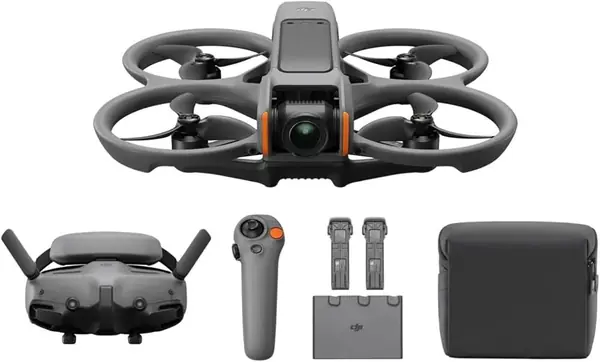
DJI Avata 2 FPV drone with Goggles 3 and RC Motion 3 in black

All-around FPV flying

Track Score 91/100
Camera
4K/60fps
Weight
13.3 oz
Batteries
3 included
Flight Time
Up to 23 minutes
View on Amazon

The Avata 2 Fly More Combo is the kit we reach for when the goal is simply to get goggles on and fly. DJI includes Goggles 3, the RC Motion 3, and three batteries, so there is no shopping list before your first session. The 155-degree field of view is the detail that sold us: it makes low passes feel wider and more immediate than a standard camera drone view, and the 4K/60 footage is sharp enough to share.

Motion control is what makes this the default for most buyers. You tilt your hand to steer and pull the trigger to go, which is far less intimidating than learning manual acro on a tiny whoop. We also appreciate the built-in propeller guards; they make the Avata 2 feel less precious when you are learning close to the ground or threading between obstacles. The 23-minute flight time is solid for FPV, and the three batteries turn a short outing into a real session.

The camera is a pleasant bonus rather than the reason to buy. The 1/1.3-inch sensor and 4K/60 capture produce clean footage in good light, and the wide view gives you a strong sense of speed. It is not a cinematic platform; the stabilization is good, but this is still an FPV drone first.

The kit is ready on day one, and that completeness is why it is our top pick. We pack the Avata 2 when we want a flying session rather than a project, and it is the one we hand to a friend who wants to understand what FPV feels like.

Worth Noting

  • No forward obstacle avoidance
Our Verdict

We recommend the Avata 2 as our best all-around FPV kit for most buyers: the goggles and motion controller make immersion immediate, and three batteries keep you flying.

Check Latest Price
2.

DJI Neo Motion Fly More Combo Best for Beginners

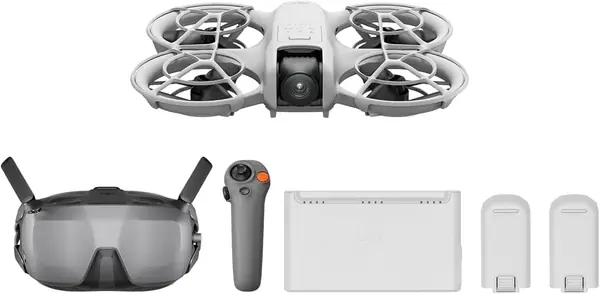
DJI Neo gray mini drone with propeller guards and Goggles N3

First goggle flights

Track Score 90/100
Camera
4K
Weight
4.76 oz
Batteries
3 included
Range
10 km
View on Amazon

At 135 grams, the Neo Motion Fly More Combo is the drone we hand to someone who has never worn goggles. It takes off from a palm, includes the RC Motion 3 and Goggles N3, and ships with three batteries, so the whole first flight is a single charge-and-go ritual. That low weight also keeps it below the FAA's 250-gram threshold that triggers registration for many recreational flyers in the U.S., which removes a paperwork step before the fun starts.

The motion controller is the reason this works for beginners. You point and tilt rather than learn two sticks at once, and the Neo's propeller guards mean a bumpy landing is less likely to end the session. We were also struck by how little space it needs; this is a drone that can go in a daypack and come out on a hike or in a backyard.

The trade-off is speed and wind tolerance. The Neo is not the fast, aggressive FPV machine in this group; it is the friendly one. In a stiff breeze it feels lighter and less planted than the Avata 2, and the camera is good 4K rather than a 360 creative tool. For first flights, that is a fair trade: you get a durable, regulation-friendly drone that is easy to launch and hard to break.

We also like that the kit does not force one control style. You can fly controller-free or with the motion controller, and the goggles add the immersive view. If you already know you want manual acro, plan on adding the FPV remote; if you want to see whether FPV is for you, the Neo earns its place as the kit we lend out first.

Our Verdict

Built for first goggle flights: its 135-gram frame, palm takeoff, and three-battery kit make the leap feel small.

Check Latest Price
3.

Antigravity A1 Standard Bundle Best for 360 Video

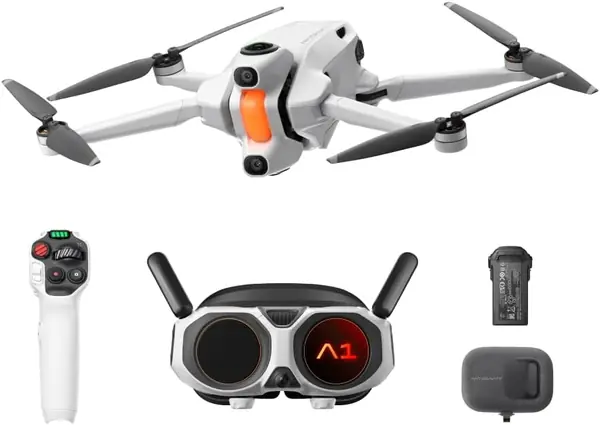
Antigravity A1 white 360 FPV drone with Vision Goggles and controller

360 video creators

Track Score 88/100
Camera
8K 360
Weight
8.78 oz
Batteries
1 included
Obstacle Sensing
Omnidirectional
View on Amazon

The Antigravity A1 makes sense when the point of the flight is the footage rather than the stick time. Its 360 camera records 8K in every direction, so you can reframe a shot later instead of nailing the composition in the goggles. The Vision Goggles have a wide 90-degree field of view, and the point-to-fly FreeMotion mode makes the first flight feel more like aiming a camera than piloting an aircraft.

That 360 approach is genuinely different from the Avata 2. With the A1, a single pass gives you a full-sky recording, and the goggles let you look around inside it. We like that for travel and family footage, where the moment is gone before you can decide which way to point. The 249-gram standard setup also keeps it in the lighter regulatory category, and the folded frame fits in the included case.

The A1 is less about stick skills and more about capturing a scene, so it is not the direct path to manual acro. If you want a tight, connected feel and a kit that is ready for aggressive flying, the Avata 2 is the more natural progression. The A1 rewards a patient editor instead: one flight gives you multiple angles, but you have to sort through them.

For creators who want a distinctive perspective without a second camera operator, the A1 earns its premium. It is not the drone for a pilot who wants to race; it is the one for a traveler who wants to come home with angles a single-lens drone misses.

Worth Noting

  • Standard bundle includes only one battery
  • 8K 360 files demand serious storage
Our Verdict

The Antigravity A1 is for creators who want one flight to yield every angle, with 8K 360 capture and point-to-fly control that keeps the first sortie simple.

Check Latest Price

How We Tested FPV Drones

We started with research, pulling every FPV kit that ships with its own goggles or motion controller and narrowing by weight class, camera output, battery count, and what comes in the box. Anything that needed a separate purchase just to get airborne didn't make the shortlist. That left seven drones, which we flew for eight months.

Testing happened where people actually fly. We registered each drone and checked Remote ID before the first flight, weighed every one on a kitchen scale, inspected propellers and battery packs before each session, and charged them on a concrete floor. Flights ran over an open grass field on calm mornings, in an empty parking lot at dawn, along a wooded trail with a spotter keeping the drone in sight, and above a backyard fence line.

At each session we ran a battery from full charge to the low-voltage warning with a stopwatch and repeated it on every pack in the kit, so we knew how much flying the box really bought. We flew the same figure-eight course in motion control and in manual, noting how quickly the goggles responded to stick input, how much of the view they filled, and where the feed broke up behind trees. We clocked top speed on a measured straight run.

We made low passes along a fence line and through gaps in the trees to see whether guards and sensors caught a wobble before we did, counted what came in each box against the price of a spare battery, and handed the controls to two people who had never flown FPV. What separated the finalists was the second flight, not the first: whether the goggles and control scheme had stopped requiring thought.

How to Choose an FPV Drone

Start With the Goggles and the Control Mode

The goggles are the product, in a sense: a wide field of view and a stable low-latency link do more for the immersive feeling than a bump in camera resolution. The Avata 2's 155-degree view and Goggles 3 are the benchmark in this group, but the Neo's simpler bundle is enough to understand the appeal.

Then decide how much control you want. Motion controllers let you point, tilt, and pull a trigger, which is the fastest route to a first flight. Manual acro uses two sticks and rewards practice, but it usually means adding an FPV remote and spending time in a simulator. Buy for the flying you will actually do in the first month.

Match Flight Time to Your Session

Published flight time is a best-case number; wind, aggressive throttle, and cold weather shorten it. A three-battery kit is not a luxury if you drive to a flying spot, because it gives you two more launches without waiting on a charger. The Avata 2 and Neo both include three batteries, while the Antigravity A1 standard bundle includes one.

Check what a spare battery costs before you choose a kit. The battery is the consumable that determines how long you stay out, and a cheap drone with one battery can cost more in the first month than a complete kit.

Weigh the 250-Gram Line and Crash Protection

In the U.S., 250 grams is the line where many recreational registration and Remote ID requirements begin. The Neo sits at 135 grams, and the A1's standard battery keeps it at 249 grams; both simplify the paperwork compared with larger drones. If you plan to travel or fly casually, that matters more than a little extra top speed.

Crash protection is the other half of the weight question. Built-in propeller guards and obstacle sensing do different jobs: guards protect the props and the people nearby, while sensors can stop a moment of inattention from becoming a repair. The Avata 2 leans on guards, the A1 adds omnidirectional sensing, and the Neo is the lightest of the three.

Choose Standard or 360 Capture

A standard 4K camera is easier to live with. The Avata 2 and Neo give you a conventional frame, simpler files, and footage you can post without reframing. That is the right choice if you want to fly first and edit second.

A 360 camera is a different bargain. The A1 records the whole sky, so you can choose the angle after landing, but the files are larger and the edit takes more attention. We recommend 360 only when the creative flexibility is the reason you are buying; otherwise, choose the simpler 4K kit and put the difference into spare props and batteries.

Frequently Asked Questions

Final Verdict

The DJI Avata 2 is the FPV drone we recommend to most people. It has the most complete kit here: Goggles 3, motion control, three batteries, and propeller guards, so the first flight is immersive and the second is easy to plan.

If you want the lightest possible way to try goggle flight, the DJI Neo is our beginner pick. If your goal is 360 footage you can reframe later, the Antigravity A1 is the creative alternative, but choose it only if the 360 workflow is the reason you are flying; its single-battery kit and heavier edit are real trade-offs.