Best FPV Drone Controllers of 2026

A radio that doesn't speak your quad's language is the quickest way to ruin a first FPV flight. The controller is the gear you touch every second in the air, and the wrong one shows up as a dropped link, a gimbal that fights your thumbs or an evening lost to firmware menus.

Start with the link protocol, not the spec sheet; a radio that can't bind to your receiver is a paperweight. We flew 12 controllers, from budget two-stick radios to motion controllers you steer with your wrist, setting failsafe before every first flight and watching for what only shows after a few packs: gimbals that stay smooth, batteries that last the session and setup that doesn't eat an evening.

Our Top Picks

The Best FPV Drone Controllers

1.

DJI FPV Remote Controller 3 Best Overall
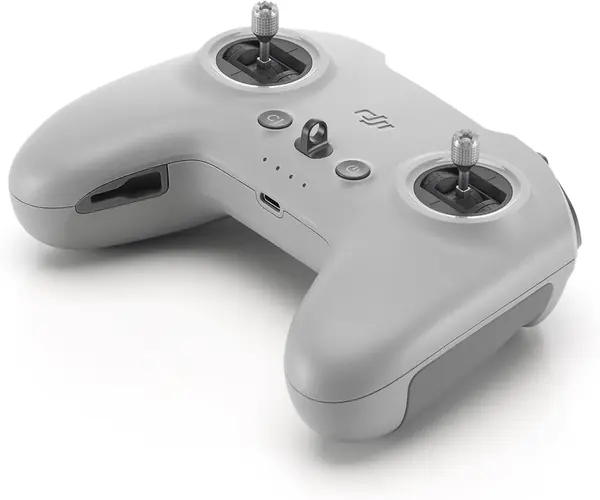
Gray DJI FPV Remote Controller 3 transmitter with two control sticks and integrated antenna

DJI FPV pilots

Track Score 94/100
Weight
8.47 oz
Compatible Drones
DJI Neo, Avata 2, O3/O4 air units
Max Range
13,000 meters
Flight Modes
Normal, Sport, Manual
View on Amazon

Manual mode is the reason to buy this one. On DJI's FPV drones the motion controller does most of the flying; put the RC 3 in your hands, flip to Manual, and the goggles show you a quad that goes exactly where your thumbs put it, with no self-leveling between you and the ground. That is the flight most people are chasing when they get into FPV.

What kept us coming back was the ordinary stuff. At 8.47 ounces it hangs off a lanyard without dragging at your neck, the sticks have real tension and adjust with the included screwdriver, and binding it to Goggles 3 and an Avata 2 was quick and uneventful. The rated 13,000-meter range is far past anything legal line-of-sight flying uses, so treat it as headroom rather than an invitation to fly farther.

The catch is the ecosystem, not the hardware. It binds to DJI's O3 and O4 air units, the Avata 2 and the Neo, and nothing else — not an older Mavic, and not the ELRS receiver on a self-built quad. If you build your own machines, the Radiomaster Pocket below is the smarter buy and roughly half the money goes to a link you can actually use.

Then there is the desktop half of the job. Liftoff, Uncrashed, DCL and the Drone Racing League sim all recognize it, which means the hours before your first Manual flight can be spent crashing a virtual quad instead of a real one. Buying the radio before you buy spare props is the cheaper order of operations.

Our Verdict

If you fly DJI's FPV drones, this is the controller that turns them into manual-mode machines, and it comes first on this list.

Check Latest Price
2.

Radiomaster Pocket ELRS Best for Custom Quads

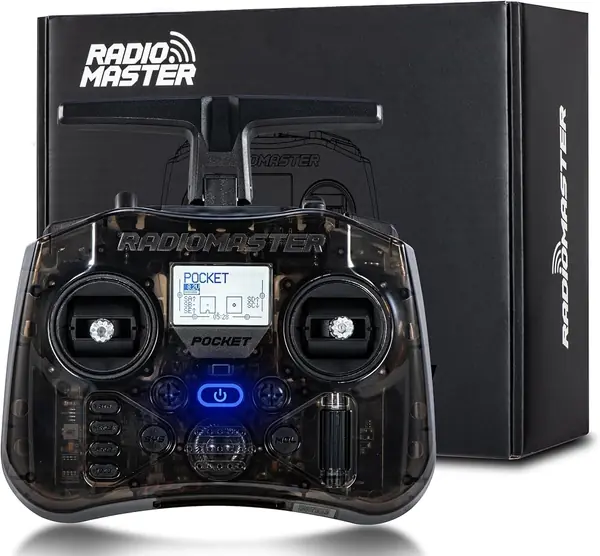
Radiomaster Pocket ELRS transmitter in black with hall-effect gimbals and backlit LCD screen

Custom ELRS quads

Track Score 90/100
Battery
18650, not included
Channels
16
Protocol
ExpressLRS 2.4 GHz
Gimbals
Hall-effect
View on Amazon

Small enough to share a bag with your goggles — that is the Pocket's whole pitch, and it holds up. A full-size transmitter means a case, a shoulder strap and a separate trip back to the car. This is seven ounces of radio that slides in next to a spare pack.

Inside that shell is more radio than the size suggests: ExpressLRS on 2.4 GHz, hall-effect gimbals, 16 channels and EdgeTX 2.10.5 already flashed. We were surprised by how much of a full-size transmitter's feel survives the shrink, and the backlit LCD plus the little LED strip that mirrors your switch positions sound like gimmicks until you are flying at dusk.

Then there is the software. EdgeTX is a small computer, so budget an evening with the manual or start from a model file someone else has already proven for your quad. What that evening buys is a radio that remembers your whole fleet: switching from a 5-inch to a whoop is a menu choice rather than a re-bind, and USB-C charging means a power bank covers a full day at the field.

Worth Noting

  • 18650 cell sold separately
Our Verdict

Our pick for self-built quads: ExpressLRS, EdgeTX and hall gimbals in a radio small enough to carry every day.

Check Latest Price
3.

DJI RC Motion 3 Best for First-Time FPV Pilots

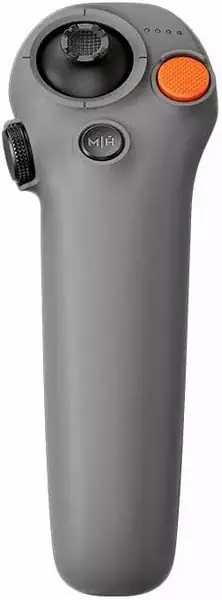
DJI RC Motion 3 gray motion controller with trigger and included lanyard

Easiest to Fly

Track Score 89/100
Weight
3.88 oz
Compatible Drones
DJI Neo, Avata 2, Mini 4 Pro, Air 3
Control Style
Motion, wrist and trigger
Goggles Required
DJI Goggles 3
View on Amazon

Point it where you want to go and squeeze the trigger. That is the entire flight lesson with the RC Motion 3, and it is why we hand it to people who have never flown anything — no left stick to unlearn, no coordinated-turn problem to solve. Within a couple of packs we were threading the Avata 2 through gaps that take far longer to reach on sticks.

Two features do the heavy lifting. One button brakes the drone and holds a hover, so a flight that goes sideways ends calmly instead of in a hedge, and with Goggles 3 the same remote drives an AR cursor through the goggle menus, which means your hands never leave it mid-flight. It also works one-handed or two, which matters more than it sounds when you are carrying something else.

The dead end is manual mode. Point-and-fly is wonderful for smooth cinematic passes and tight indoor work, and it will not teach you the stick skills that freestyle needs. If you fly for footage rather than for the trick, that is not a loss — but if you want acro, put the money toward a two-stick radio and spend the winter on a simulator instead.

Worth Noting

  • Requires DJI Goggles 3 to fly
Our Verdict

We hand this to anyone who has never flown FPV — pointing beats stick practice for a first flight, and the brake makes it safe.

Check Latest Price
4.

BETAFPV LiteRadio 3 Best Budget

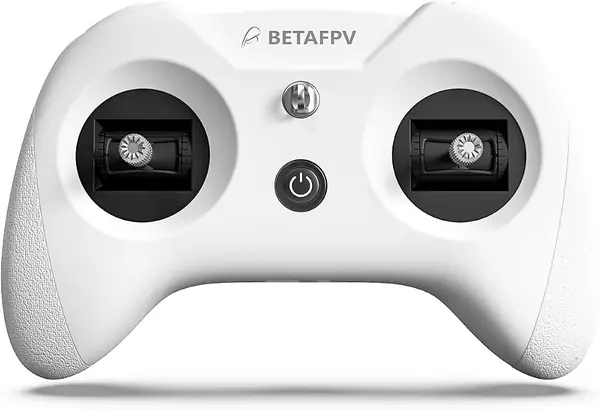
BETAFPV LiteRadio 3 white FPV transmitter with two gimbals and a lanyard loop

Budget first setups

Track Score 85/100
Battery
Built-in 2,000 mAh
Protocol
ExpressLRS 2.4 GHz
Runtime
Up to 15 hours
Module Bay
Nano, ELRS/CRSF/TBS
View on Amazon

Least expensive way into ExpressLRS here, and one of the few that arrives with its battery already fitted. There is no 18650 to buy and no charger to hunt down: a 2,000 mAh cell is built in, USB-C tops it up, and BETAFPV rates it at up to 15 hours between charges.

Practice is the other half of the pitch. Plugged into a PC it shows up as a gamepad for VelociDrone, Liftoff, TRYP, DRL and DCL, and the sticks are the ones you will actually fly with, so the hours transfer. BETAFPV's Configurator handles firmware updates and stick calibration when you need them.

Nothing about it feels premium, and that is the trade. The plastic body is light enough that a proper lanyard earns its place, taking the strain off the case as well as your neck, and at this end of the market you are buying a reliable link rather than a nice finish. For whoop flying and sim practice that is a trade worth making; for a long-range build with a module bolted on, we point you to the Pocket instead.

The nano bay on the back is what keeps it relevant. It takes an ELRS, CRSF or TBS module, so the radio you bought for a whoop can grow into longer-range gear without being replaced — and it is the one we lend out, because a charged cell and a sim lead is the shortest path from curiosity to a first real flight.

Worth Noting

  • Only three buttons for control
Our Verdict

A cheap, self-contained ELRS radio that doubles as a sim controller, and a sensible start for pilots who aren't sure yet.

Check Latest Price
5.

Radiolink AT9S Pro Best for Fixed-Wing FPV Builds

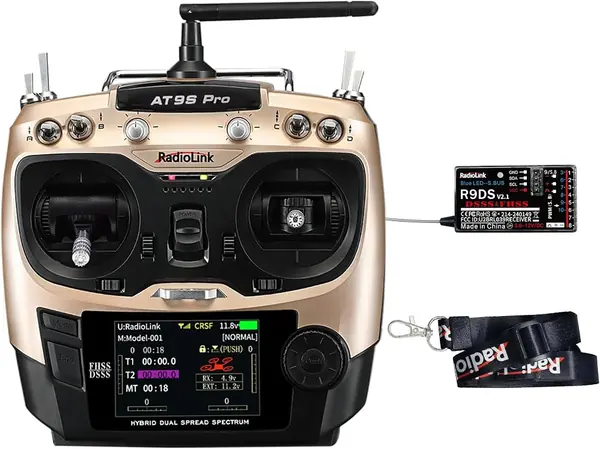
Radiolink AT9S Pro champagne gold transmitter with LCD screen and two gimbals

Fixed-wing FPV builds

Track Score 84/100
Battery
8 AA
Channels
10 or 12
Range
3.4 km
Screen
2.8-inch LCD
View on Amazon

Eight AA cells. The AT9S Pro does not hide what it is: a big, old-school transmitter with a battery door, a 2.8-inch screen on the front and a strap lug — the kind of radio that lives in a field box rather than a jacket pocket.

What the bulk buys is information. The LCD shows signal strength and, with a compatible sensor, pack voltage; alarms arrive as sound, vibration and on-screen text; and there are 10 or 12 channels along with throttle lock, failsafe, endpoint adjustment and a 3-in-1 port that takes a simulator lead or a Crossfire module. On a big airplane, seeing your numbers without digging out a laptop or pulling on goggles is worth more than a smaller case would be.

We treat it as the fixed-wing radio of this group rather than a freestyle tool. It runs 1.9 pounds before you add cells, it needs a Radiolink receiver in the aircraft, and ELRS is not native, so a modern quad needs a module or a different radio entirely. The claimed 3.4-kilometer range is a clean-air best case. For a cruiser flown line-of-sight from a club field, none of that is a dealbreaker.

Worth Noting

  • LCD washes out in direct sun
Our Verdict

We like it for fixed-wing FPV, where the screen and telemetry earn their space; freestyle quad pilots should keep looking.

Check Latest Price
6.

FS-i6X Transmitter Best for First-Time Builders

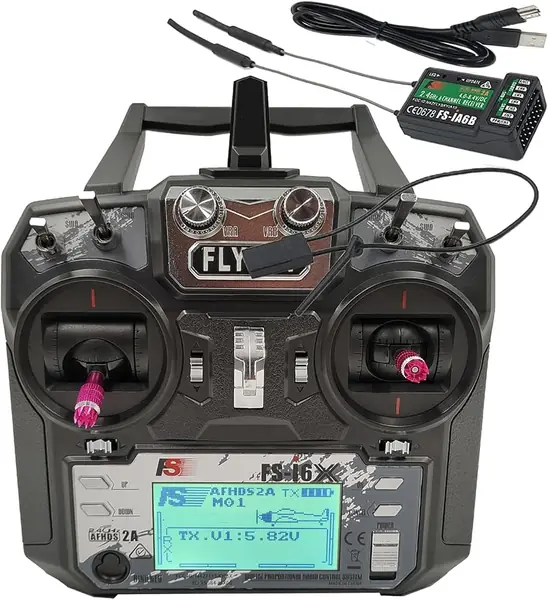
Black FS-i6X transmitter with two gimbals and an FS-iA6B receiver

First-time builders

Track Score 83/100
Battery
4 AA
Channels
10
Protocol
AFHDS2A 2.4 GHz
Receiver Included
FS-iA6B
View on Amazon

A receiver comes in the box, which is exactly why we keep pointing first-time builders at the FS-i6X. The FS-iA6B does PWM, PPM, S.Bus and iBus, pairs with the radio straight out of the gate, and spares a beginner both a separate purchase and a compatibility question.

The rest is honest entry-level gear: 10 channels over S.Bus or iBus and six in plain PWM, AFHDS2A on 2.4 GHz, 20 model memories, and a lead in the box that turns it into a simulator controller — most radios make you buy that separately. Four AA cells run it.

What it is not is an FPV-native link, so a modern quad with an ExpressLRS receiver is out unless you add a module or swap receivers. The menu system also assumes you will find a tutorial; even the instructions walk you through holding OK for two seconds just to get in. For line-of-sight flying, sim practice and a first fixed-wing, that is a fair trade, and the receiver alone covers much of what you spend.

Worth Noting

  • No ELRS or CRSF link
Our Verdict

For budget builders who need a radio and a receiver in a single order.

Check Latest Price

How We Tested FPV Drone Controllers

We started with the link. Every radio was sorted first by protocol and receiver compatibility, because a controller that can't bind to the gear you already own is a nonstarter no matter how good the sticks feel. From there we filtered by price, size, and the kind of flying each one was built for — cinewhoops, freestyle quads, fixed-wing builds, and the motion controllers that only work with a specific goggle set. That left us with 12 units to fly.

Over six months, each radio went through the same arc: bench setup, a first flight with failsafe set and verified, then longer sessions at the field. We stayed line-of-sight with a spotter on every flight, and charged lithium packs on a fire-resistant surface, never unattended. On the bench we timed how long it took to bind a receiver, change stick tension, and get the radio talking to a computer for firmware and rates. At the field we watched whether the link held at the edge of our usual flying area, how the gimbals felt after 20 minutes of thumb work, and whether the batteries lasted a full afternoon.

Swapping radios between aircraft became its own test. We noted how much rebinding and reconfiguring each one demanded, and whether settings survived the move — that's where versatility and reliability separate from good first impressions. We also weighed what came in the box against the price, and which radios we reached for on a free afternoon, because enjoyment is a real part of the value. A beginner should be able to get flying in an evening; if setup took a weekend, we said so.

We kept flying the finalists after the formal test window. We'll update this list as firmware and new receivers change the picture.

How to Choose an FPV Drone Controller

Start With the Link, Not the Radio

Every controller here speaks a protocol, and the aircraft has to carry a receiver that matches it. ExpressLRS is the open standard on most self-built quads; DJI's O3 and O4 air units answer only to DJI's own FPV radios; AFHDS2A and DSSS/FHSS belong to trainers and fixed-wing gear.

The trap is the word compatible. The DJI RC 3 flies the Avata 2 and Neo but not a Mavic, and the RC Motion 3 needs Goggles 3 specifically, not Goggles 2 or Integra. Read the receiver in your aircraft before you read anything else about a controller.

Two Sticks or a Wrist

Point-and-fly is a real alternative, not a toy. With a motion controller the aircraft follows your wrist and a trigger, which is faster to learn than two sticks and, for smooth cinematic passes or tight indoor flying, more fun to use.

What it doesn't build is stick skill. Manual mode — the acro flying most FPV pilots are working toward — needs a two-stick radio with gimbals that hold their centering. Decide which of those two futures you're buying for before you compare specifications.

Gimbals, Tension and Rates

Hall-effect gimbals sense stick position magnetically rather than through a wearing potentiometer, which is the main reason modern radios keep their centering. Past that, tension and rates shape how a quad feels far more than channel count does.

The DJI RC 3 ships with a screwdriver for stick tension; an EdgeTX radio like the Pocket puts rates, expo and mixes in a menu. If you enjoy tuning, buy the menu. If you want to fly, buy the screwdriver — and if you're unsure, buy the radio with the bigger community, because someone has already posted the settings you need.

Batteries, Weight and What Actually Travels

Three power arrangements show up here: a built-in cell charged over USB-C, a user-supplied 18650, and a tray of AA batteries. Built-in is simplest and lightest; 18650 is the field-swappable favorite, and it's the specification people miss — the Radiomaster Pocket ships without a cell. AA trays keep a large radio running but add weight and an ongoing cost.

Size matters as much as capacity. A full-size transmitter means a case and a separate trip to the car; seven ounces in a jacket pocket is a radio that actually comes with you.

Budget for the Setup Evening

Almost nothing here is truly plug-and-play. EdgeTX radios want rates, switches and failsafe configured before the first arm; DJI's gear pairs in minutes but ties you to its ecosystem; and a simulator is the cheapest crash insurance in the hobby, which is why we weight sim support so heavily.

The practical test is whether you can bind the radio and set failsafe in one sitting. If that sounds like a weekend you don't want, buy the DJI path. If it sounds like fun, buy the Pocket.

Frequently Asked Questions

Final Verdict

If you fly DJI's FPV drones, start with the DJI FPV Remote Controller 3. Manual mode is the difference between owning a camera drone and flying an FPV quad, and nothing else here makes that switch as easy.

For a self-built quad, the Radiomaster Pocket is the better buy: ExpressLRS, EdgeTX and hall gimbals in a radio that fits in a jacket. And if you already own Goggles 3 and have never flown before, the RC Motion 3 gets you airborne in an afternoon.