Best FPV Drone Simulators of 2026
Every experienced FPV pilot gives beginners the exact same first piece of advice: buy a real radio transmitter first, plug it into your computer, and log 10 to 20 hours in an FPV simulator before ever arming a real quadcopter outdoors. Unlike GPS camera drones that hover automatically when you let go of the sticks, a manual ("acro" or "rate" mode) FPV drone stays tilted at whatever angle you leave it—and accelerates violently toward the nearest tree or parking lot if your thumbs hesitate for half a second.
Crashing in a simulator costs zero dollars and resets with a single button press. Crashing a real 5-inch freestyle quad on your maiden flight costs bent motor bells, fractured carbon-fiber arms, torn battery straps, and hours at the soldering bench. Picking the right simulator depends on what you want to fly—tight racing gates, creative bando freestyle, sweeping mountain cinema, or indoor micro whoops—and how strong your computer's graphics card is.
Why 10 to 20 hours in a sim matters before real flight
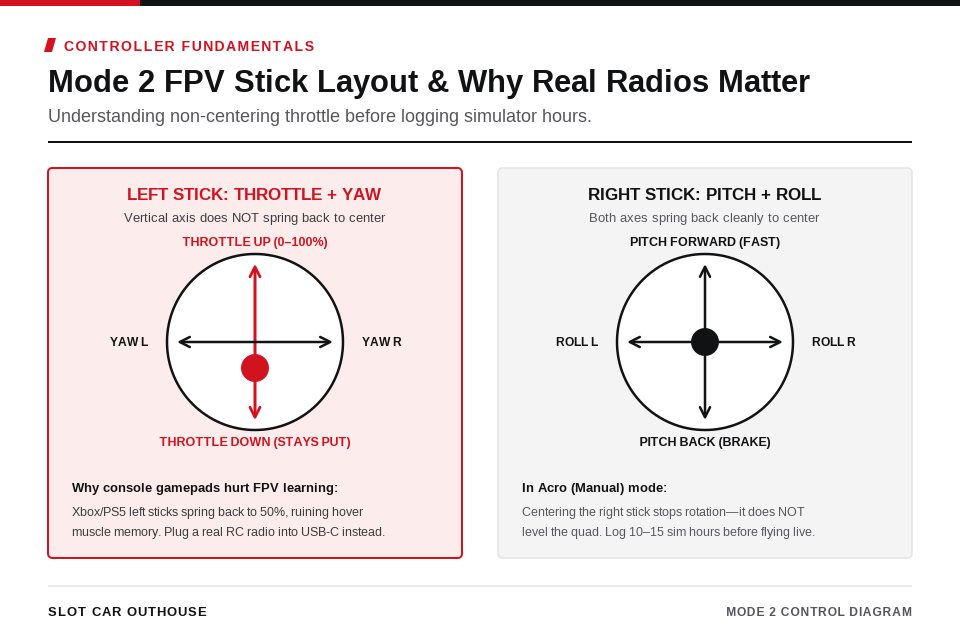
Most camera drones fly in self-leveling modes where releasing the sticks locks the drone in place. FPV racing and freestyle drones fly in acro mode, where moving the right stick tells the flight controller how fast to rotate (degrees per second), not what angle to hold. Centering the stick simply stops the rotation—if the nose is pitched 30 degrees forward, the quad stays pitched 30 degrees forward and keeps accelerating until you actively pull back.
At the same time, in standard Mode 2 controls:
- Left stick up/down (Throttle): Controls motor power directly with no centering spring. Zero at the bottom, full thrust at the top.
- Left stick left/right (Yaw): Spins the nose left or right around the vertical axis.
- Right stick up/down (Pitch): Tilts the nose forward or back.
- Right stick left/right (Roll): Banks the drone sideways like an airplane wing.
Coordinating roll and yaw together through a turn—while feathering throttle so you neither rocket into the sky nor drop into the grass—feels deeply unnatural for the first five hours. Around hour 10, your brain stops translating thumb movements consciously and starts flying by instinct. That transition is where 90% of beginner crashes happen, and making those mistakes on a screen instead of over asphalt is the single highest-return habit in the RC drones and FPV hobby.
The best FPV drone simulators compared
| Simulator | Best For | Physics Feel | PC / GPU Demand | Platforms | Pricing Model |
|---|---|---|---|---|---|
| Velocidrone | Competitive racing & accurate stick feel | Crisp, locked-in, race-tuned | Very low (runs on laptops) | Windows, macOS, Linux | Direct purchase (~$20–$25 + optional DLC packs) |
| Liftoff | Best overall for beginners & freestyle | Balanced, customizable | Moderate | Windows, macOS, Linux (Steam) | Paid (~$20; Micro Drones sold separately) |
| Uncrashed | Freestyle polish & chase-car practice | Tunable; slightly lighter out of the box | Moderate–High (Unreal Engine) | Windows (Steam) | Paid (~$15) |
| Tryp FPV | Cinematic long-range & mountain surfing | Smooth, cinematic, large-scale | High (needs dedicated GPU) | Windows (Steam) | Paid (~$17) |
| DRL Simulator | Structured step-by-step beginner lessons | Heavier, racing-league spec | Moderate | Windows, macOS (Steam) | Paid (~$10) |
| FPV Logic | Pure freestyle physics enthusiasts | Very locked-in, strong propwash feel | Moderate | Windows (Steam) | Paid (~$15) |
| Tiny Whoop GO | Free indoor micro whoop practice | Lightweight 65mm whoop feel | Very low | Windows, macOS, Linux | Free |
Velocidrone — the racing physics gold standard
Ask ten competitive MultiGP drone racers which simulator feels closest to a real 5-inch racing quad, and most will name Velocidrone. Its visuals look utilitarian next to Unreal Engine titles, and it is sold directly from the developer's website rather than Steam, but its flight model is famous for crisp rotational authority, believable drag, and realistic cornering weight.
Velocidrone also shines for hardware accessibility: it runs smoothly on modest laptops and older Macs without choking frame rates—crucial because low FPS and input lag ruin stick timing. You get an enormous library of official and community-built race tracks, competitive leaderboards, and optional add-on packs for Micro Class (whoops and toothpicks) and Freestyle / Nemesis environments.
Liftoff & Liftoff: Micro Drones — best all-rounder for beginners
If you want one polished Steam package that teaches you from zero and stays fun for hundreds of hours, Liftoff is the safest first buy. It offers clean onboarding tutorials, an interactive workbench where you can swap frames, props, batteries, and Betaflight-style PID/rate profiles, and a massive Steam Workshop filled with community maps and quads.
If your first real drone will be a 65mm or 75mm indoor ducted quad, grab its sibling title Liftoff: Micro Drones. Flying tiny whoops around tight hallways, bookshelves, and furniture requires a completely different throttle touch than open-field 5-inch flying, and Micro Drones models indoor airflow and compact environments far better than scaling down a big-quad sim.
Uncrashed — sharp visuals and fun freestyle targets
Built on Unreal Engine, Uncrashed looks dramatically sharper than older sims while remaining easier on mid-range GPUs than massive open-world titles. It is a standout playground for freestyle pilots—offering abandoned industrial yards, parking structures, forests, and dynamic moving targets like drifting cars and motocross bikes that let you practice smooth chase lines.
Out of the box, many pilots find Uncrashed's default quads slightly "floaty" compared to real-world gravity, but its physics menu exposes gravity, air drag, and prop dynamics directly so you can dial in a heavier, snappier feel in five minutes.
Tryp FPV — cinematic and long-range mountain surfing
Tryp FPV targets pilots drawn to sweeping alpine dives, ridge surfing, and dynamic cinema rather than tight race gates. Its maps are huge and visually atmospheric, stocked with moving rally cars, drift tracks, base jumpers, and winding mountain roads that mimic real-world long-range shoots.
The catch is hardware appetite: Tryp FPV expects a capable modern dedicated graphics card to maintain a steady 60+ FPS. If your laptop struggles, stick to Velocidrone or Liftoff until you upgrade.
DRL Simulator — best guided lessons for absolute beginners
The official Drone Racing League Simulator includes one of the most structured step-by-step training campaigns in FPV. Instead of dropping you into an empty field to guess what to do, DRL walks you through hover control, throttle management, gate alignment, and split-S turns with clear on-screen prompts.
Its physics model is tuned around heavier, larger DRL racing frames, which can feel slightly floaty if you plan to fly nimble 5-inch freestyle builds, so many pilots use DRL for their first 5 to 10 hours of fundamentals and then graduate to Velocidrone, Liftoff, or FPV Logic.
FPV Logic — crisp freestyle stick feel
FPV Logic has earned a loyal following among freestyle pilots who care more about how a quad drops out of a powerloop than how many maps are in the menu. Its propwash behavior, hang time, and weight transfer feel impressively close to a tuned 5-inch freestyle rig, making it a strong second simulator once you already know the basics and want sharper trick muscle memory.
Tiny Whoop GO — zero-cost entry into indoor FPV
Not sure if FPV is even for you? Tiny Whoop GO is completely free, lightweight, and laser-focused on 65mm ducted micro drones zipping through living rooms, warehouses, and indoor courses. Pair it with an affordable radio and you can test whether acro flight clicks for you without spending a dime on software.
Why some sims feel "floaty" vs "locked-in"
Spend an hour switching between simulators and you will immediately notice they do not all feel identical. Pilots usually describe the gap as "floaty" versus "locked-in."
A floaty sim feels like your quad is flying in low gravity—when you cut throttle at the top of a climb, the drone lingers in the air too long, drifts wide through corners, and recovers effortlessly from steep vertical drops. That happens when a simulator under-models air drag, battery weight, or propwash (the turbulent dirty air a drone falls through when descending straight down into its own exhaust).
A locked-in sim feels crisp, heavy, and immediate: snap a roll and the quad stops cleanly without wobble, cut throttle and it drops briskly, and pull out of a dive too fast and you hear and feel slight propwash flutter just like a real build.
To make any simulator transfer cleanly to real-world flying:
- Match your camera tilt: Start between 15° and 25° of camera uptilt. Higher tilt (35°–45°) forces faster forward speed and makes hovering or landing much harder for beginners.
- Keep frame rates high (60+ FPS minimum): Lower visual detail if needed. Smooth, predictable input latency matters far more than realistic tree shadows.
- Set realistic rates early: Avoid ultra-twitchy 1,000+ deg/s rates on day one. Moderate Betaflight actual rates (around 600–700 deg/s max with gentle center sensitivity) make smooth lines much easier to learn.
Controller setup: why a real RC radio beats a gamepad
It is tempting to test an FPV simulator with an Xbox or PlayStation controller already sitting on your desk. Resist that urge if you intend to fly a real drone.
Gamepads fail FPV training for two mechanical reasons:
- Spring-centered left stick: On a console controller, letting go of the left stick snaps it back to the 50% middle position. On a real RC radio, the throttle stick has smooth friction without a centering spring—it stays exactly where you put it. Learning to hold a thumb pushed upward against a spring to hover builds muscle memory that you will immediately have to unlearn on a real quad, often by accidentally slamming the throttle to 50% when you meant to disarm or cut power.
- Short thumbstick travel: Console thumbsticks are tiny and imprecise. Full-size or mid-size Hall-effect RC gimbals give you far longer physical throw, letting you make millimeter-level throttle corrections through tight gaps.
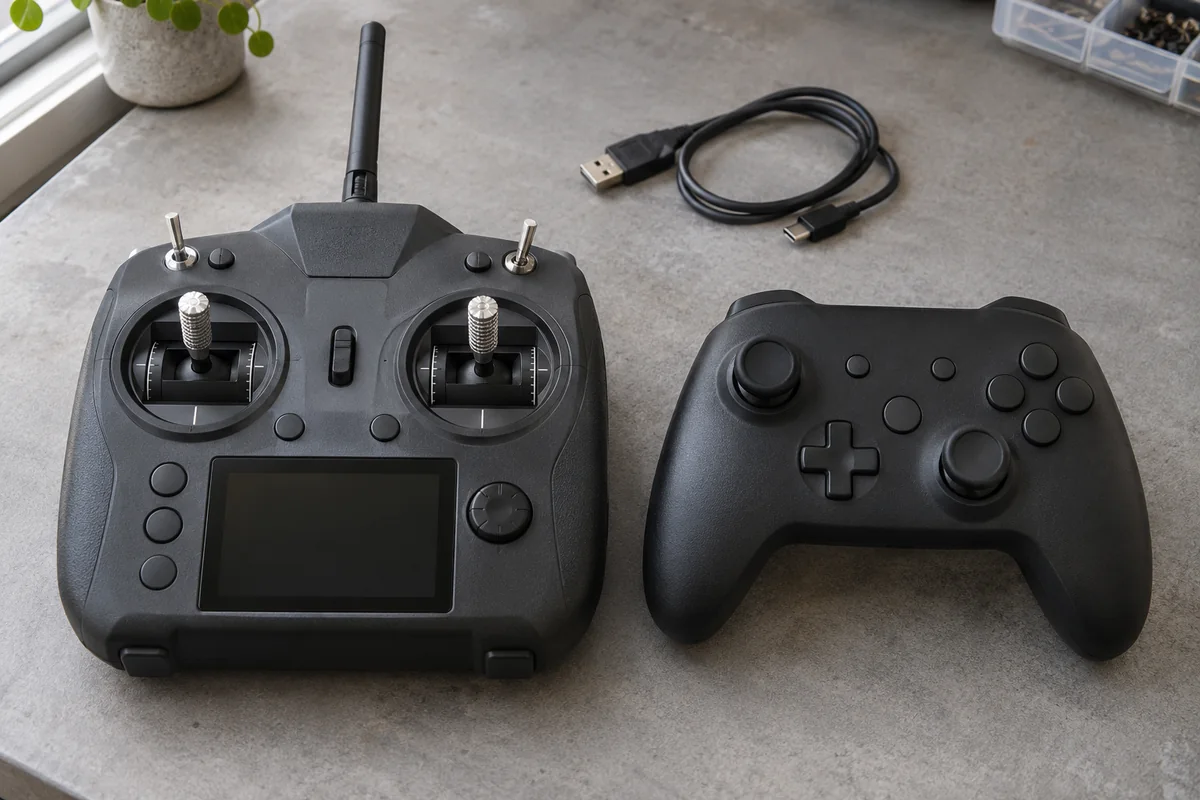
Instead, buy a real ExpressLRS (ELRS) radio transmitter running EdgeTX—such as the compact RadioMaster Pocket, mid-size RadioMaster Boxer, or full-size RadioMaster TX16S. You will use that exact same radio to fly your real drones later, so nothing is wasted.
Connecting an EdgeTX radio to a PC or Mac takes under two minutes:
- USB-C Joystick (Best / lowest latency): Plug a USB-C data cable into the radio's top USB port (not the bottom charging-only port) and select USB Joystick (HID) on the radio's pop-up prompt. Windows, macOS, and Steam recognize it automatically as a game controller—then run the in-sim stick calibration wizard once.
- ELRS Bluetooth Joystick (Cable-free): On internal ELRS modules, open the ExpressLRS Lua script on your radio and enable BLE Joystick, then pair it via Bluetooth to your computer. It adds a tiny bit of wireless convenience for couch sessions, though USB-C remains the crispest option for racing.
Once your simulator sessions feel automatic and you are ready to step into real packs and hardware, check our best LiPo battery brands guide before ordering flight packs and chargers.
Practical buying rules: picking your first sim
- Want one safe, polished first purchase? Start with Liftoff (or Liftoff: Micro Drones if you plan to start indoors on a 65mm/75mm whoop).
- Focused on drone racing or running an older laptop? Buy Velocidrone—nothing beats its combination of crisp physics and low hardware requirements.
- Love cinematic chase footage and own a strong gaming PC? Pick Uncrashed for freestyle and car-chasing, or Tryp FPV for sprawling mountain dives.
- Total beginner who wants hand-holding tutorials? Run through DRL Simulator's training missions first, or test the waters for free with Tiny Whoop GO.
- Budget order of operations: Spend ~$65–$140 on an ELRS radio first, $15–$25 on a simulator second, and wait until you can fly ten clean laps without crashing before spending $300–$800 on goggles, quads, and batteries.
Sources
Frequently Asked Questions
Most beginners reach basic safe control—taking off, flying controlled figure-8s, keeping track of orientation, and landing gently without panicking—after 10 to 20 hours of focused acro practice spread over a couple of weeks. Shorter 20- to 30-minute daily sessions build muscle memory much faster than one marathon weekend binge.
Start directly in Acro (Manual) mode from hour one. Angle mode feels comforting for ten minutes, but it teaches you to hold the right stick forward continuously to fly straight—a habit that causes immediate flips and crashes the first time you switch to acro. Simulators let you survive the clumsy first three hours of acro for free.
Yes, if your goggles have an HDMI input (common on Walksnail, HDZero, and many analog box/binocular goggles). Plugging your goggles into your PC's HDMI port adds realism and helps you get used to tunnel-vision immersion, though flying on a regular monitor builds 95% of the exact same stick muscle memory.
Several top options run natively or smoothly on macOS, including Velocidrone, Liftoff, DRL Simulator, and Tiny Whoop GO. Unreal Engine-heavy Windows titles like Uncrashed and Tryp FPV are Windows-first and generally require a Windows gaming PC for reliable high frame rates.
Nine times out of ten, the issue is one of two things: you plugged into the radio's bottom charging-only USB port instead of the top data USB port, or you are using a power-only USB-C cable that lacks internal data wires. Swap to a known data cable on the top port and confirm USB Joystick (HID) is selected on the radio screen.