Best Slot Car Track Layout Software of 2026
Snap together enough plastic curves on a living-room floor and you quickly hit the classic slot-car frustration: the last two track ends miss each other by two inches, or they only connect when you twist the plastic hard enough to bow the joints and create electrical dead spots. Worse, you might spend $250 on extra curves and borders only to discover your dream circuit hangs six inches past the edge of your 4×8 table. Slot car track layout software solves those headaches up front—checking loop closure, table footprint, border clearance, lane-length equality, and exact part counts before you buy a single expansion pack.
Your best choice comes down to your track brand and operating system. Autorennbahnplaner is the gold standard for Carrera builders on Windows, Ultimate Racer 3.0 (UR30) is the best multi-brand Windows suite (and doubles as full race-timing software), RailModeller Pro leads natively on macOS, and SoftyRoyal or TrackPower remain handy multi-brand classics. If you only need a quick free sketch for Carrera sets, Carrera's own browser-based Track Planner gets you started with zero installation.
Why slot car CAD matters (and how it differs from model trains)
Designing a slot car circuit looks similar to planning a model railroad, but the engineering constraints are surprisingly different. Unlike flexible model-train track that you can trim with rail nippers, sectional slot car track uses rigid molded plastic with fixed electrical rails. Good slot car software solves four problems that freehand sketching misses:
- Closing the loop cleanly: Plastic track allows a tiny bit of horizontal flex over a long run, so software tracks your exact X/Y and angular closure gap. Keeping closure tolerances tight (generally within a few millimeters and under 1–2 degrees across a large table) prevents strained locking clips, bumpy seams, and intermittent power dropouts.
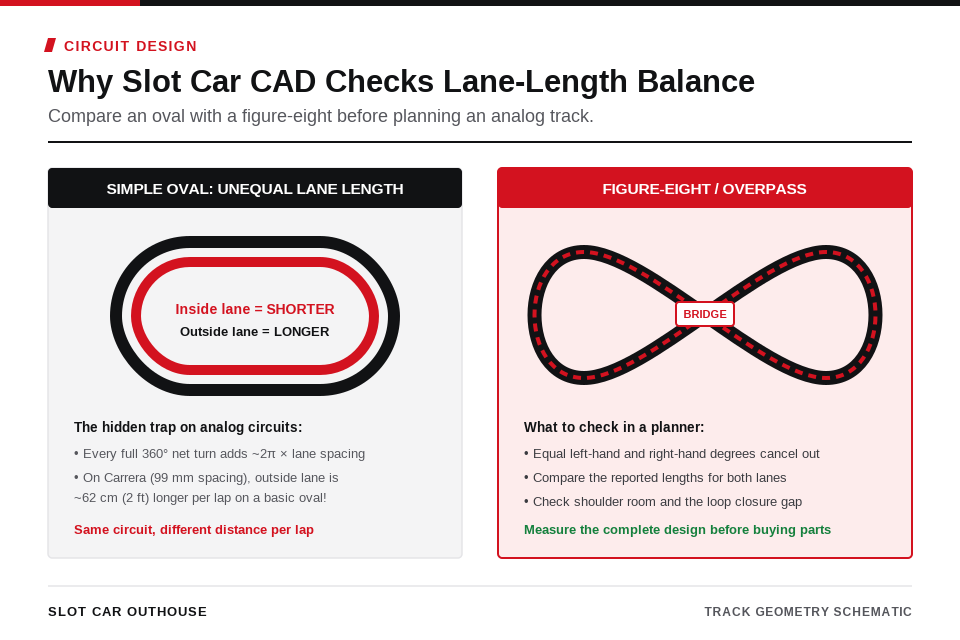
- Lane-length balance (crucial for analog racing): On a simple flat oval, the inner lane is noticeably shorter than the outer lane—giving Lane 1 an unfair lap-time advantage on every lap. On a two-lane analog track, balancing left-hand and right-hand turns—or routing the circuit into a figure-8 overpass—equalizes both lanes to the exact millimeter. Layout software displays exact length for each individual slot so you can tune symmetry before building. (On digital layouts where cars overtake and share lanes, lane balance matters less, though smooth racing lines still count—see our digital vs analog slot cars guide.)
- Border and apron clearance for drifting: This is the number-one mistake beginners make when measuring a table. A 1:32 or 1:24 car sliding through an R1 or R2 corner kicks its rear bumper out past the edge of the track. Adding outer borders (aprons) adds 60 mm to 100+ mm of extra width around the outside of every hairpin. Software that models real brand-specific borders shows immediately whether cars will clear walls, guardrails, and table edges.
- Budgeting expansion packs before buying: Larger sweeping radii like R2, R3, and R4 curves—plus digital lane changers and pit lanes—are the priciest parts of slot car track and accessories. An automatic Bill of Materials (BOM) lets you compare what you already own in your inventory against what you still need to order.
Best slot car track layout software compared
| Software | Operating System | Track Brands Covered | 3D / Elevation | Race Management | Pricing |
|---|---|---|---|---|---|
| Ultimate Racer 3.0 (UR30) | Windows | Carrera, Scalextric, Ninco, SCX, AFX/Tomy HO, Policar, Wood | Elevation profiles (2D) | Yes (full lap timing, fuel, hardware) | Free tier / Paid full license (~$20–$30) |
| Autorennbahnplaner | Windows | Carrera (D132, D124, Evolution, GO!!!, D143) | Yes (3D view + elevations) | No (design focused) | Free demo / Paid license (~$25–$35) |
| RailModeller Pro | macOS | Carrera, Scalextric, Ninco, SCX, AFX/Tyco HO (+ trains) | Yes (3D preview + elevations) | No (design focused) | Free Express (50 pcs) / Paid Pro (~$40) |
| SoftyRoyal / TrackPower | Windows | Scalextric, Carrera, Ninco, SCX, AFX HO, Policar | Basic elevation / 3D | No (design focused) | Free / low-cost legacy licenses |
| Carrera Web Track Planner | Any (Browser) | Carrera (D132, D124, Evolution, GO!!!) | Basic 2D/3D | No | 100% Free |
| Scalextric ARC App | iOS / Android | Scalextric ARC sets (preset layouts only) | No | Yes (Bluetooth ARC race control) | Free (companion app, not full CAD) |
Ultimate Racer 3.0 (UR30) — best all-round Windows designer + race manager
For longtime slot car builders on Windows, Ultimate Racer 3.0 (UR30) is the Swiss Army knife of the hobby. Its track designer supports almost every major plastic track system—Carrera, Scalextric Classic and Sport, Ninco, SCX, Policar, Artin, AFX/Tomy HO, Tyco—and even lets custom builders lay out routed wooden tracks with custom lane spacing.
UR30 calculates exact individual lane lengths, checks table boundaries, manages your personal track inventory (so it tells you how many extra pieces you need beyond the starter sets you already own), and handles multi-lane 4-, 6-, or 8-lane club circuits cleanly. Its standout bonus is its built-in Race Management System (RMS): connect a track sensor interface, USB lap counter, or compatible digital powerbase, and UR30 runs timed practice, qualifying, championships, pit stops, and voice callouts right from the same software. Its interface feels utilitarian rather than sleek, but its depth is hard to beat.
Autorennbahnplaner — top dedicated pick for Carrera layouts
If you race Carrera—whether Evolution, Digital 132, Digital 124, GO!!!, or Digital 143—Autorennbahnplaner (available in full English and German) is purpose-built for your track geometry. Because Carrera track is wider than Scalextric and relies heavily on outer borders, shoulder pieces, and R1/R2/R3/R4 multi-radius curves for sweeping 4-lane corners, having a planner tuned specifically to Carrera's catalog saves enormous friction.
Autorennbahnplaner snaps inner and outer borders cleanly along curves, flags collisions and tight clearances, renders an interactive 3D view with bridge elevations and pit-lane geometry, computes exact lane lengths, and exports an itemized Carrera part-number shopping list. You can test its layout tools with a free demo before unlocking the full paid Windows version. Still deciding between Carrera and Scalextric hardware? Read our Carrera vs Scalextric comparison before locking in a track library.
RailModeller Pro — the standout native macOS choice
Most classic slot car CAD tools were written strictly for Windows, leaving Mac owners stuck with workarounds. RailModeller Pro solves that cleanly. Though famous in the model train world (see our best model train layout software guide), it includes extensive native slot-car track libraries covering Carrera, Scalextric, Ninco, SCX, and AFX/Tyco HO.
It delivers native macOS polish, smooth Apple Silicon performance, multi-layer organization (handy for separating elevated overpasses from lower straights), 3D elevation previews, table-outline templates, and automatic Bills of Materials. Its free RailModeller Express edition supports up to 50 pieces on one layer—plenty to experiment with a starter set expansion—before upgrading to Pro for larger tables.
SoftyRoyal and TrackPower — classic multi-brand Windows designers
SoftyRoyal and TrackPower are longtime staples in the 1:32 and HO slot car community. Both focus purely on track design without the complexity of race-timing hardware, offering multi-brand libraries (Scalextric Classic/Sport, Carrera, Ninco, SCX, and popular HO systems like AFX/Tomy) along with basic bridge/elevation support and parts counts.
Their interfaces show their age compared to modern apps like RailModeller Pro or Autorennbahnplaner, and update cadences are slower for brand-new specialty pieces, yet both remain lightweight, straightforward options for planning classic Scalextric or HO table layouts on older Windows PCs.
Carrera Official Web Track Planner — best zero-install free option
Carrera hosts a free browser-based Track Planner that runs on Windows, Mac, and tablets with no download required. You select your Carrera product line (Digital 132, Digital 124, Evolution, or GO!!!), define your room or table dimensions, and snap official track pieces and sets together in minutes.
It is ideal for quick "what fits on my spare table?" brainstorming and generating starter shopping lists. For intricate custom tables, complex elevated multi-level scenery, or mixing inventory across custom borders and third-party parts, dedicated desktop tools like Autorennbahnplaner or UR30 still give you far more precision.
What about the Scalextric ARC App?
New racers frequently search for a "Scalextric official track designer" and download the Scalextric ARC App, expecting custom CAD. It is important to know what the app actually does: ARC is a Bluetooth race-control companion for ARC ONE, ARC AIR, and ARC PRO powerbases. It includes official pre-built layouts for retail slot car sets and basic track-pack diagrams, not a freeform custom track CAD engine. If you want to invent custom Scalextric Sport layouts on a 4×8 or L-shaped table, design the layout in Ultimate Racer 3.0, TrackPower, or RailModeller Pro, then race it using the ARC app.
Practical design tips before you buy extra track
Even the best CAD program cannot drive your layout for you, so apply four real-world racing rules while sketching on screen:
- Mix curve radii instead of relying only on tight R1 hairpins: Starter sets pack R1/standard tight turns to keep boxes small, which makes cars feel choppy and prone to deslots. Adding sweeping R2 and R3 curves—especially decreasing-radius entry corners—transforms how smoothly cars carry speed.
- Leave marshaling reach: Never design a table deeper than 30 to 36 inches against a wall unless you can walk around the back. When a car de-slots in the far corner behind a bridge, you need to reach it without leaning on fragile barriers or track joints.
- Budget space for straights before digital lane changers: Place digital lane changers on straight runs (ideally with at least one full straight leading in) rather than immediately exiting a tight turn, where drifting tails can cause missed IR triggers or side-swipe collisions.
- Plan power-tap points on big loops: Once your software reports a lane length over 45 to 50 feet, plan two or three hidden jumper-wire power taps from the powerbase to the far side of the layout so cars never bog down on distant corners.
Practical decision rules: which planner should you use?
- Building a Carrera Digital 132, Digital 124, or Evolution layout on Windows? Start with Carrera's free web planner for quick ideas, then use Autorennbahnplaner for exact border clearances, 3D views, and part-number shopping lists.
- Building a Scalextric, Ninco, Policar, HO, or routed wood layout on Windows? Use Ultimate Racer 3.0 (UR30)—especially if you also want PC lap timing and championship management down the road.
- Designing on a Mac? Download RailModeller Express free to test your table fit, then unlock RailModeller Pro once your track exceeds 50 pieces.
- Only tweaking a retail Scalextric ARC starter set? Check the preset track maps inside the free Scalextric ARC app before buying extra curves.
Sources
Frequently Asked Questions
On a typical 1:32 plastic track (Carrera or Scalextric) measuring 30 to 50 feet long, a horizontal closure gap under 10 to 15 mm and an angular mismatch under 1 to 2 degrees usually flexes closed cleanly without stressing joints. Larger gaps force track sections to bow upward, creating dead electrical spots and noisy seams; use half-straights, quarter-straights, or mixed curve angles to close the loop properly.
The cleanest mathematical guarantee is a figure-8 layout (one overpass crossing), which automatically gives both lanes identical total inside and outside turn arcs. On a flat layout without a bridge, design an equal total angle of left-hand and right-hand turns of matching radii—and verify the exact millimeter readout per lane inside UR30, Autorennbahnplaner, or RailModeller Pro.
A 4×8-foot (1.2 × 2.4 m) plywood table is the classic minimum footprint for an engaging two-lane Scalextric 1:32 layout with room for borders. Because Carrera 1:32 track is wider (1:24 spacing), a comfortable Carrera Digital 132 layout with borders typically shines on a 5×10-foot table or an L-shaped corner build. If space is tight, HO scale fits huge technical circuits onto a 4×6 or 4×8 board.
Yes. Ultimate Racer 3.0 supports custom track geometry, variable lane spacing, and full-scale printouts/dimensioning that wood-track builders use to plan MDF routing paths. Builders doing complex multi-lane club wood tracks also pair UR30 with general 2D CAD tools or flexible drafting splines before cutting the slots with a router.
Yes—always turn borders on in your planner before checking table fit. Outer borders add 60 mm to over 100 mm on the outside of every curve, and skipping them on a 1:32 track causes cars to hang their rear wheels off the edge of the plastic and deslot constantly—especially if you ever remove traction magnets for realistic drifting.