Best Portable Soldering Irons for Travel and Field Repairs of 2026

A cordless soldering iron feels like freedom until you touch the tip to a ground plane and watch the temperature slide. That sag turns a five-minute repair into a cold, grainy joint you have to redo, and it's why so many portable irons end up in a drawer. A good one holds its heat with no outlet in sight.

Box wattage tells you almost nothing. Recovery after a heavy joint separates these tools, and it depends on the power source, a USB-C PD pack, a tool battery you already own or butane, and how much heat the tip can deliver. Controls matter more than first-time buyers expect: a readable display and a sleep timer that kicks in when you set the iron down save a battery for the joint that matters. The eight picks held their heat at a bench, a kitchen table, a garage and inside a car.

Our Top Picks

The Best Portable Soldering Irons for Travel and Field Repairs

1.

PINE64 Pinecil Best Overall
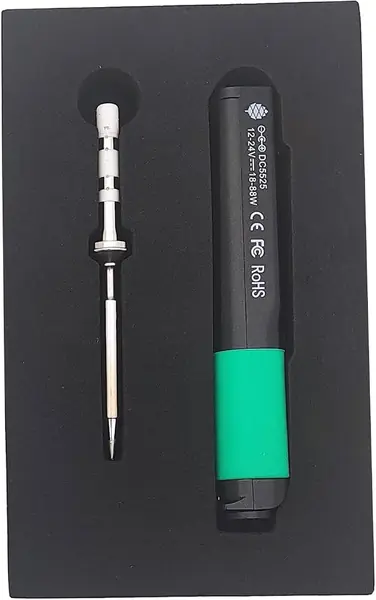
PINE64 Pinecil smart mini soldering iron with stainless steel handle and OLED screen

Traveling electronics work

Track Score 93/100
Weight
2.12 oz
Heat-up Time
12 seconds
Display
0.69-inch OLED
Power Input
USB-C PD/QC 3.0 and DC5525
View on Amazon

The first thing we noticed about the Pinecil is how little room it takes up: at 2.12 ounces and 6.1 inches long, it disappears into a tool roll next to a multimeter. The 65-watt element reaches operating temperature in about 12 seconds, and the 0.69-inch OLED gives you a readable setpoint without a phone app. We also like that it accepts both USB-C PD/QC and a DC5525 barrel feed, so the same soldering pen can run from a laptop-class brick, a power bank, or a field battery with the right adapter.

The temperature range runs from 100°C to 400°C, and the two-button interface is simple enough to adjust with gloves off. Because it runs IronOS, you can dig into standby timers, boost behavior, and custom menus if you want; we mostly left it in the simple mode and appreciated the auto-standby when we set it down between joints. The tip is replaceable, and the barrel is slim enough to work around crowded boards.

What makes the Pinecil our top pick is the balance of heat, size, and power flexibility. It is not the most complete kit here, since the TS101 includes a supply and stand, but it wins when the bag is already full. Pair it with a 65-watt PD source or a DC pack that can deliver 12 to 20 volts at 3 amps; a basic phone charger will not cut it. For board work, RC connectors, and track-side repairs where you already carry power, it is the default we recommend.

Worth Noting

  • Power supply not included
Our Verdict

We recommend the Pinecil to most people because it packs 65W of heat into an 88-gram pen that runs from the USB-C brick or battery pack you already carry.

Check Latest Price
2.

UY CHAN TS101 Best Complete Kit

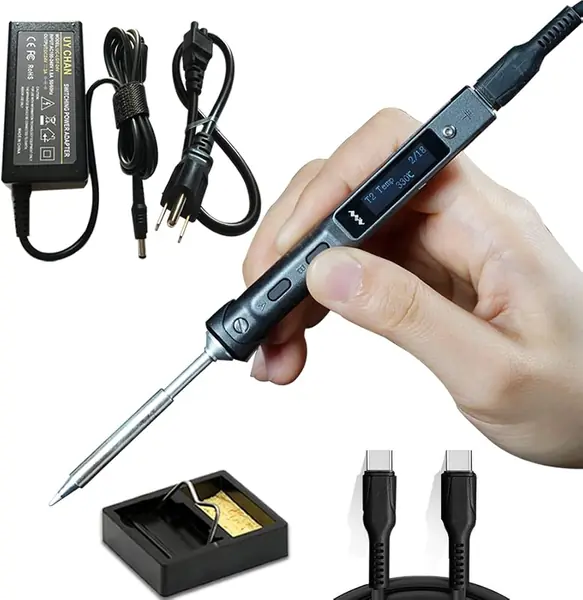
UY CHAN TS101 soldering pen kit with B2 tip stand and USB-C cable

Complete field kit

Track Score 92/100
Weight
3.53 oz
Max Temperature
400 °C
Power Input
DC 9–24V 65W and USB-C PD 45W
Included Power Supply
24V DC US-standard
View on Amazon

The TS101 is the kit we recommend when you want to open one box and start soldering. It arrives with a 24-volt DC power supply, a USB-C to USB-C silicone cable, a stand, and a B2 tip, so you are not hunting for a compatible brick before your first joint. At 3.53 ounces and 16.8 centimeters long, it is still small enough for a glovebox or a crowded bench drawer, but the included supply makes it feel more like a portable station than a bare pen.

The iron accepts DC input from 9 to 24 volts and USB-C PD at up to 45 watts, with 65 watts available on DC. That headroom shows up in the way it recovers after a joint: the boost function adds heat quickly for a stubborn connection, and the dual temperature sensors and overheat warning give you some guardrails. We also appreciated the auto-sleep behavior; it drops temperature when you set it down and comes back fast when you pick it up.

The interface is more involved than the Pinecil's, with a deeper menu for presets, firmware, and startup behavior. That is useful if you like to tune a tool, but it also means the first ten minutes are spent reading the manual. As a travel kit for RC fields, auto wiring, and general electronics, the completeness is the point: we prefer carrying this one box to improvising a supply and stand.

Worth Noting

  • Default B2 tip is large for SMD
Our Verdict

We recommend the TS101 when you want a complete field kit in one box, with the power supply, cable, and stand that the bare pens make you source separately.

Check Latest Price
3.

Milwaukee M12 Soldering Iron Best for M12 Users

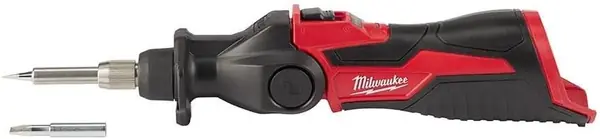
Milwaukee M12 cordless soldering iron with chisel tip and pivoting head

M12 battery users

Track Score 91/100
Weight
9.59 oz
Run Time
Up to 40 minutes
Max Temperature
750 °F
Battery Platform
M12 12-volt
View on Amazon

If you already own Milwaukee M12 batteries, the 2488-20 is less a soldering iron than another way to use the packs in your truck box. The tool-only body weighs 9.59 ounces without a battery, heats to working temperature in under 18 seconds, and tops out at 750°F. The three-stop pivoting head is the detail we like most: it lets you angle the tip into a footwell, a fuse box, or a tight chassis gap without turning the whole tool sideways.

That pivoting head is what earns it a place here. In our testing, the adjustable angle made it easier to reach connectors that a straight pen could only approach from an awkward wrist position. The heat indicator and REDLINK electronics take some guesswork out of when the tip is ready and when it is safe to store, and the 40-minute run time on a compact pack is enough for a run of connectors or a quick repair.

This is a field iron, not a bench precision tool. The chisel and pointed tips cover automotive and appliance work, but the 750°F ceiling and the tool's bulk make it less suited to fine SMD than the pen-style options. For a mobile technician or a Milwaukee-heavy shop, the platform trade is easy to make.

Worth Noting

  • Battery and charger not included
Our Verdict

The M12 iron is the one we hand to a Milwaukee user who wants a truck-ready tool and already has charged battery packs waiting.

Check Latest Price
4.

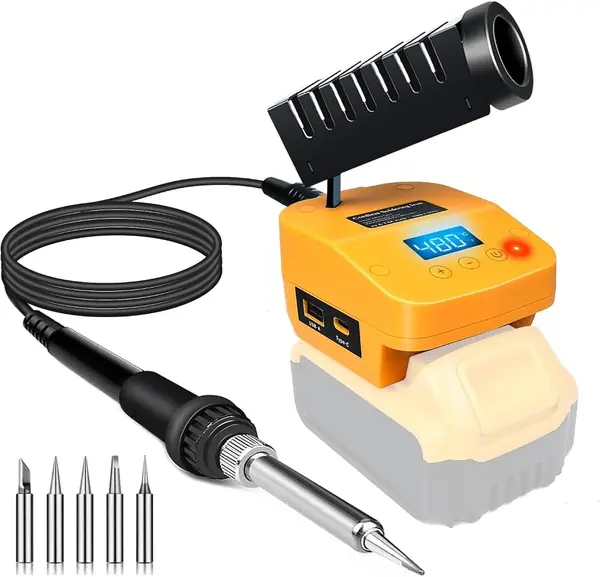
QSDXNYDC 20V Soldering Iron Best for DeWalt Batteries

QSDXNYDC cordless soldering iron for DeWalt 20V batteries in orange

DeWalt battery users

Track Score 90/100
Weight
15.2 oz
Heat-up Time
8 seconds to 350°C
Max Temperature
480 °C
Battery Platform
DeWalt 20V Max, not included
View on Amazon

This iron is the budget route into cordless soldering for anyone already on the DeWalt 20V Max platform. It is built for DeWalt 20V Max packs, and the 60-watt heater reaches 350°C in about eight seconds with a 480°C ceiling, which is more than enough for connectors, small wire, and appliance repairs. We like the dual Celsius/Fahrenheit display and the memory function: set your working temperature once, and it comes back there next time.

The body is heavier than the pen-style irons at 15.2 ounces, but a battery pack gives it a low center of gravity, and the included holder keeps it stable on a bench or tailgate. We also appreciated the USB and USB-C charging ports on the station; they turn it into a small power bank for a phone or a test light. The low-battery reminder and overvoltage, short-circuit, and overcurrent protections are useful extras at this end of the price range.

The 8-second heat-up and 480°C ceiling make it a credible tool-battery alternative to the Milwaukee for DIYers who do not need the pivoting head or the M12 ecosystem. It is not as pocketable as a USB-C pen, and the display and controls are more basic, but for a truck kit or a home garage it covers the common jobs. For a truck kit or a home garage, the platform makes it an easy second tool.

Worth Noting

  • Requires a DeWalt 20V Max battery
Our Verdict

For a DeWalt 20V user, we think this is the budget way into cordless soldering, and it heats fast enough for connectors and small wire.

Check Latest Price
5.

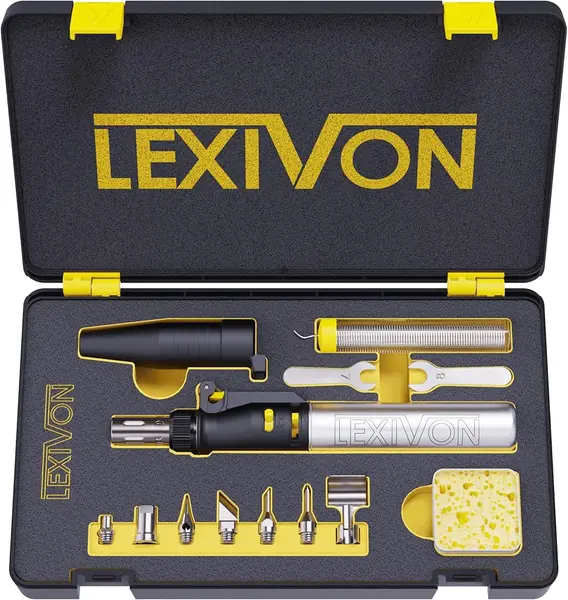
LEXIVON LX-770 Best Butane Option

LEXIVON butane soldering iron kit with black handle and multiple tips

Cordless butane repairs

Track Score 89/100
Run Time
Up to 75 minutes
Fuel
Standard butane, not included
Kit Contents
13 pieces
Soldering Temperature
Up to 1,100°F
View on Amazon

A butane iron is the tool when the repair is in a boat bilge, a deer camp, or a parking lot with no outlet in sight. The LEXIVON LX-770 is a 13-piece kit built around a refillable aluminum tank, with a self-igniting trigger and a flame lock. It runs up to 75 minutes on a fill, refuels in about 10 seconds, and adjusts from a pinpoint flame to a broader torch, with soldering temperatures up to 1,100°F and torch temperatures up to 2,400°F.

We like the long burn time and the kit's range: soldering tips, a heat gun, and a micro torch cover heat-shrink, connector work, and small brazing tasks without a cord. The ignition stopper takes a deliberate extra click before the flame lights, which is slower than a plain trigger but a sensible feature around a crowded workbench. The flame gives you continuous adjustment rather than a digital setpoint, so you learn to read the tip and the joint instead of a number.

This is not the iron we choose for fine circuit-board work; the flame control is coarser than a temperature-controlled pen, and the hot exhaust needs respect. What it does better than any battery iron here is keep working when there is no electricity, and the 75-minute tank means you are not refilling between every joint. For field repairs, heat-shrink, and light metalwork, it is the self-contained option we trust.

Worth Noting

  • Butane fuel sold separately
Our Verdict

When there is no outlet and no battery, we take the LEXIVON butane kit for its long burn and broad tip set.

Check Latest Price
6.

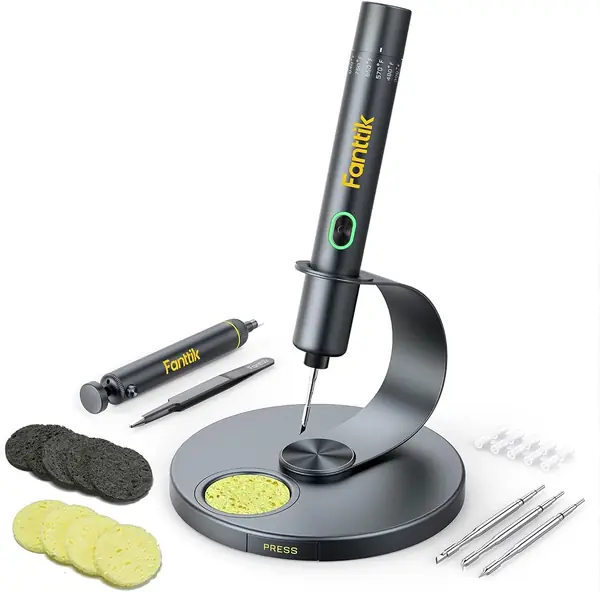
Fanttik T1 Max Best for Precision Electronics

Fanttik T1 Max cordless soldering iron in grey with four C210 tips

Precision board work

Track Score 86/100
Battery
2,600mAh, 12W output
Run Time
Up to 60 minutes at 840°F
Temperature Range
390–840°F
Tips
Four C210 tips
View on Amazon

Four C210 tips in a small aluminum stand are the first clue that the Fanttik T1 Max is aimed at bench work rather than heavy wiring. The kit includes three C210 tip shapes, with two K tips, plus tweezers, a desoldering pump, sponges, and a storage stand. At 1.04 pounds it is not a pocket pen, but the case and stand make it easy to keep the hot end contained between joints.

We like the tip selection most. Having a fine tip for a component leg and a K tip for a slightly larger pad means fewer compromises in the middle of a repair, and the tool-free tip changes are quick enough to do without hunting for a wrench. The six-position tail knob is simpler than a menu, and the auto-sleep feature kicks in after 30 seconds of stillness, which we appreciated when the iron sat on the stand during a rework.

The built-in 2,600mAh battery is rated for up to 60 minutes at 840°F, and the 390°F to 840°F range covers most through-hole and SMD work. The six-level control is less precise than a digital setpoint, but for quick electronics repairs the speed and tip choice matter more. We also like that the stand and sponges are included: it is a kit you can open on a kitchen table and put away without improvising a holder.

Worth Noting

  • 12W battery output limits larger joints
Our Verdict

The T1 Max is the compact kit we choose for circuit boards and tiny connectors where four fine tips matter more than raw wattage.

Check Latest Price
7.

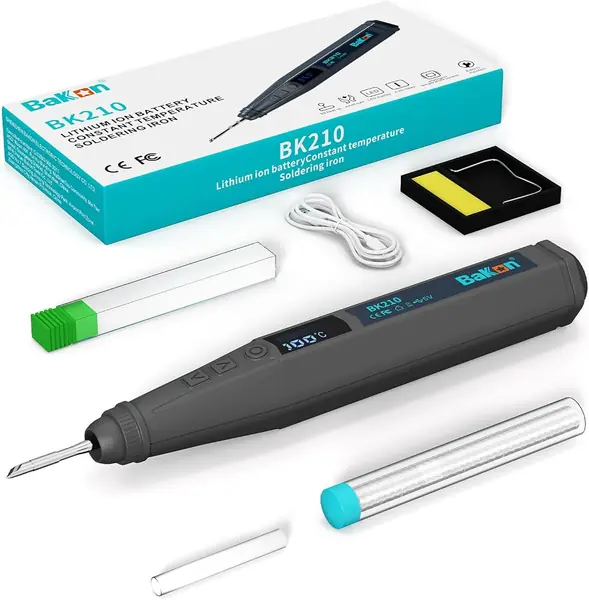
BAKON BK210 Best Budget Pen

BAKON BK210 cordless soldering pen kit with C210 tip and grey body

Budget precision soldering

Track Score 85/100
Heat-up Time
8 seconds
Battery
3,200mAh, 12W wireless
Temperature Range
356–842°F
Tip
C210 quick-heating
View on Amazon

A child lock and automatic shutoff are not the features that sell a soldering pen, but they are the ones we notice when the iron lives on a shared bench. The BAKON BK210 has both, plus a sleep mode after inactivity, and a hexagonal body that keeps the tool from rolling when you set it down. At 4.06 ounces it is light enough to use like a pen, and the matte finish gives your fingers something to grip when the tip is hot.

The C210 tip reaches working temperature in about eight seconds, and the 356°F to 842°F range is adjustable in fine steps. In wireless mode the 3,200mAh battery puts out 12 watts and is rated for up to 60 minutes at 840°F; plugged into USB-C, it switches to 16 watts for longer bench sessions. We like that the kit includes a stand, sponge, tip protection tube, solder wire, and cable, so it is ready to use without a separate shopping list.

The controls are simple enough to learn without the manual, and the display is easy to read in a dim workshop. The included solder is a starter spool, and we kept our own rosin-core wire nearby for anything serious. The kit also packs back into its box without a tangle, which matters if the iron rides in a drawer between projects.

The BK210 is the budget pen we recommend for small jobs: circuit boards, LED strips, drone leads, and quick repairs where dragging out a station is more trouble than the soldering. It is complete, compact, and comfortable enough for occasional use, and the safety features make it easier to live with around a busy bench. For a first cordless pen or a spare for the toolbox, it covers the basics without asking much.

Worth Noting

  • 12W wireless output limits big joints
Our Verdict

The BK210 gives you a complete cordless pen kit for small jobs at a budget price, with safety features we appreciate around a busy bench.

Check Latest Price
8.

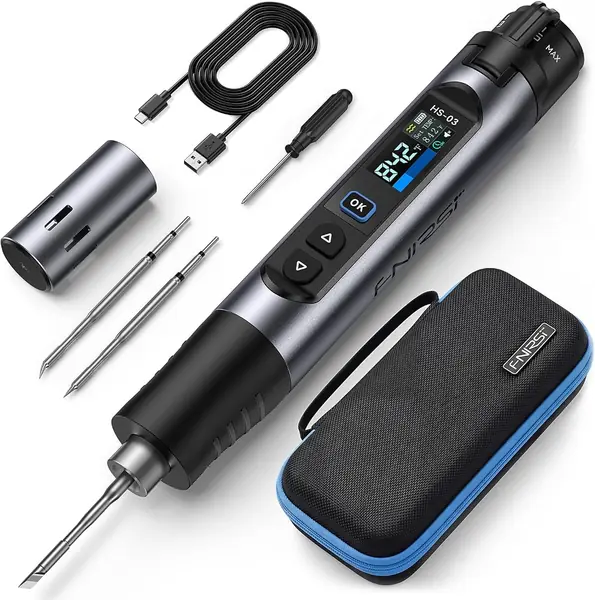
FNIRSI HS-03

FNIRSI HS-03 cordless soldering pen with IPS screen and storage bag

Compact electronics repair

Track Score 84/100
Heat-up Time
3 seconds
Battery
2,600mAh, USB-C dual-power
Temperature Range
212–842°F
Display
0.96-inch IPS color
View on Amazon

The FNIRSI HS-03 has one feature we did not expect to care about: a left/right hand mode that flips the display so the screen reads correctly whether you hold the pen in your left or right hand. It sounds like a small thing until you are working under a dashboard or around the back of a board. The 0.96-inch IPS color screen is bright enough to read at a glance, and the rear knob jumps between five preset temperatures without a menu crawl.

The 2,600mAh battery is rated for cordless use, and the USB-C port lets you solder while charging when the job runs long. Heat-up is about three seconds, the range runs from 212°F to 842°F, and the auto-sleep and standby settings are adjustable. We liked the tool-free tip swap; the three included tips cover fine pads, tight spaces, and slightly larger joints without a wrench.

The controls are a mixed bag in the way small tools often are: the knob is fast for big temperature jumps, while the buttons are better for fine adjustments. It suits small work with tight access, and the included storage bag makes it easy to keep the tips and cable together. The ambidextrous display and quick tip changes are the details that make it feel considered rather than generic.

What earns the HS-03 a place here is the combination of a readable screen, quick heat, and a genuinely useful left/right mode. It is one of the easiest irons here to live with on a crowded bench, and the bag and tips make it a complete little kit. For a hobbyist who moves between drones, game controllers, and small appliances, it is a strong step up from a fixed-temperature pen.

Worth Noting

  • 10W output limits heavy-gauge work
Our Verdict

We like the HS-03 for tight electronics work, where its clear screen and quick tip changes suit a crowded bench or a travel bag.

Check Latest Price

How We Tested Portable Soldering Irons

We started with spec sheets for close to 40 irons and narrowed to 12, covering each power path a shopper is likely to take: USB-C PD, an existing tool battery platform, a built-in lithium cell, and butane. We bought them at retail and used them for six months, at a basement workbench and wherever the job turned up — a headphone jack on the kitchen table, a trailer harness in the driveway, support cleanup on a 3D print.

Heat came first. We timed every iron from cold to working temperature, then soldered a 12-gauge wire joint to watch how far the reading dropped under load and how fast it climbed back. Accuracy got checked against a thermocouple at the low, middle, and top of each range, and runtime meant draining each battery to cutoff and timing the butane iron on a full tank.

Then we packed each one into its case and dropped it in a tool bag to see what it added, counted the tips in the box, and checked whether spares were sold separately. What came in the kit counted toward value: an iron with no stand or power supply isn't cheaper if you have to buy both. We read every display in a dim garage and in daylight, and set each iron down mid-job to see whether sleep beat the battery. Every iron went back to its stand between joints and none sat unattended hot; the battery models ran only on their stated platform and charger, and the butane iron was lit and refueled on a ventilated bench away from anything flammable, after the tip had cooled.

How to Choose a Portable Soldering Iron

Match the power source to where you work

USB-C PD/DC pens are the smallest option, but they need a power source that can actually deliver the voltage and current. A 65-watt pen on a basic phone charger will disappoint; look for PD or QC and the stated voltage range. Tool-battery irons make sense if you already own the platform, while butane is the only cord-free choice that does not care about a battery at all. The Pinecil is the lightest USB-C pick here, and the TS101 is the one that includes its own 24-volt supply.

Choose heat for the joint, not the spec sheet

Wattage is only half the story; tip mass, thermal recovery, and the size of the joint decide whether solder flows. A 10- to 16-watt pen can be perfect on a slot car motor lead or a circuit board pad, while a 60-watt tool-battery iron or a butane torch is the better call for connectors and heavier wire. Do not assume a higher temperature ceiling makes a small pen suitable for large work; it often just runs out of heat when the joint pulls it away.

Pack the stand, tips, and power you need

A bare pen is pocketable, but it is not a complete travel kit. Check whether the box includes a stand, a tip protector, a case, and the power supply; those extras are the difference between opening a box and scavenging a bench. The TS101 includes a supply and stand, the Pinecil does not, and both Milwaukee and DeWalt options are bare tools for their battery platforms. If you switch between fine and heavy work, budget for at least one spare tip.

Pick controls you can read and safety you trust

A clear display and a physical control are worth more than a long preset menu when you are wearing gloves or working in poor light. Auto-sleep and a stand matter for a tool that stays hot between joints, and a child lock is useful on a shared bench. Butane models need a deliberate ignition sequence and good ventilation; a flame-lock trigger is not a substitute for setting the tool down safely. We prefer controls that let you confirm the temperature at a glance.

Budget for the ecosystem, not just the iron

The listed price is only the entry point if the iron is a bare tool. Add the cost of a battery platform, a charger, a capable USB-C PD brick, butane, replacement tips, or a case before you decide which one is the better value. A budget pen that includes a supply and stand can cost less in the long run than a cheaper bare tool that sends you shopping. We compare kits on what they let you do out of the box, not on the headline number alone.

Frequently Asked Questions

Final Verdict

The Pinecil is the portable iron we recommend first. It is the lightest serious option here, heats in about 12 seconds, and runs from the USB-C PD brick or field pack you already carry. Pair it with a supply that can deliver the wattage it asks for.

If you want a complete kit in one box, the TS101 is the easier purchase. If you already carry Milwaukee or DeWalt packs, start with that platform's bare tool, while the LEXIVON is the right call when there is no outlet and no charged battery.